Ok so how many of you use the customer factor for route work. At first I wasn’t Then I decided to transfer over my hand drop invoices over. I have one problem with that. I like the fact that it was cloud base an I could see what is going on with receivables in the field. Before TCF I was using QB desk top
The one problem I have is I need to have the customer as reoccurring. I batch print my invoices once a month. So being that there reoccurring they go on the Calander. I do not need , nor do I want route jobs on my Calendar. There is no need for it … It’s annoying gets it the way of other things like residential, an estimates.
I don’t understand why anyone needs route work on a calendar. These are jobs you do every month you should know them , an when they get done. I brought this up with Steve he said no one has ever asked about this before.
So can someone tell me why you like your route work on the Calander
I just print all my invoices on monday and then reorganize them as I go. But TCF does have the ability to ONLY show residential on the calendar. It’s right under the little calendar on the left side and “by appointment type.”
By having route work on the calendar, I can print the each days invoices out together. And (in theory) you’ll have all your invoices organized when they come out.
Right , so in theory all you need to do is be able to print your invoices. Same here … You print each week . I print once a month. They don’t need to be on the calendar. We just need to be able to print them in batches. See I’m not insane.
Can you give me a step by step. At your convenience kind sir.
as above but also could you assign the job to a made up crew. then just select the assignments you want to show on calendar.
it’s the assigned to function i’m thinking of.
and it’s definitely you!
@JaredAI that’s it … It worked. You don’t know how much that helps me. I’m stoked.
No more route work on my Calander unless I want it in there perfect.
I owe you a big green chile cheeseburger. I think that’s what it is you crazy New Mexico’s eat .
Definetly not. Lol. I’ve been doing route work with out s calendar or directions since the 90s
I print out every month, an excel list of all my monthly accounts, an all my bi-weekly accounts. I put a mark on them when ther done., an I know we’re they are
Weekly accounts just get done every week so no need to remember anything there. I actually try to forget them every once in a while. Lol

 At your convenience kind sir.

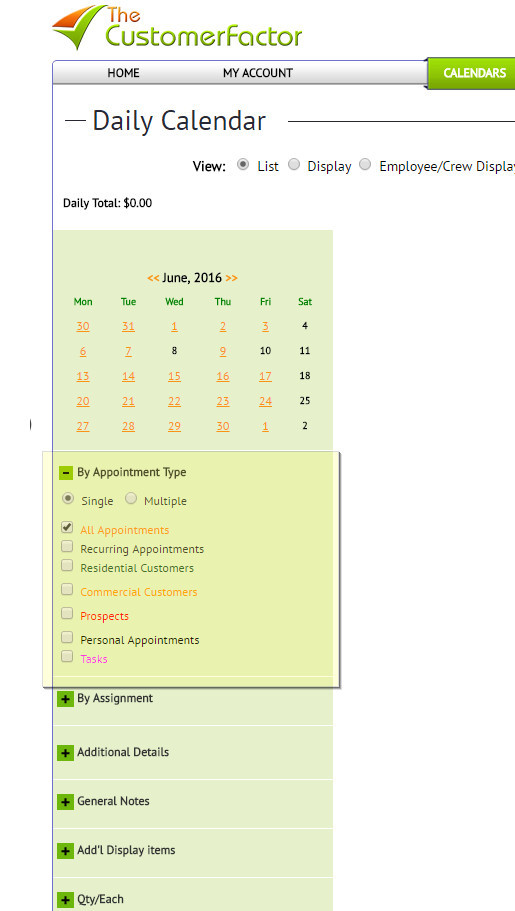
 .
.